
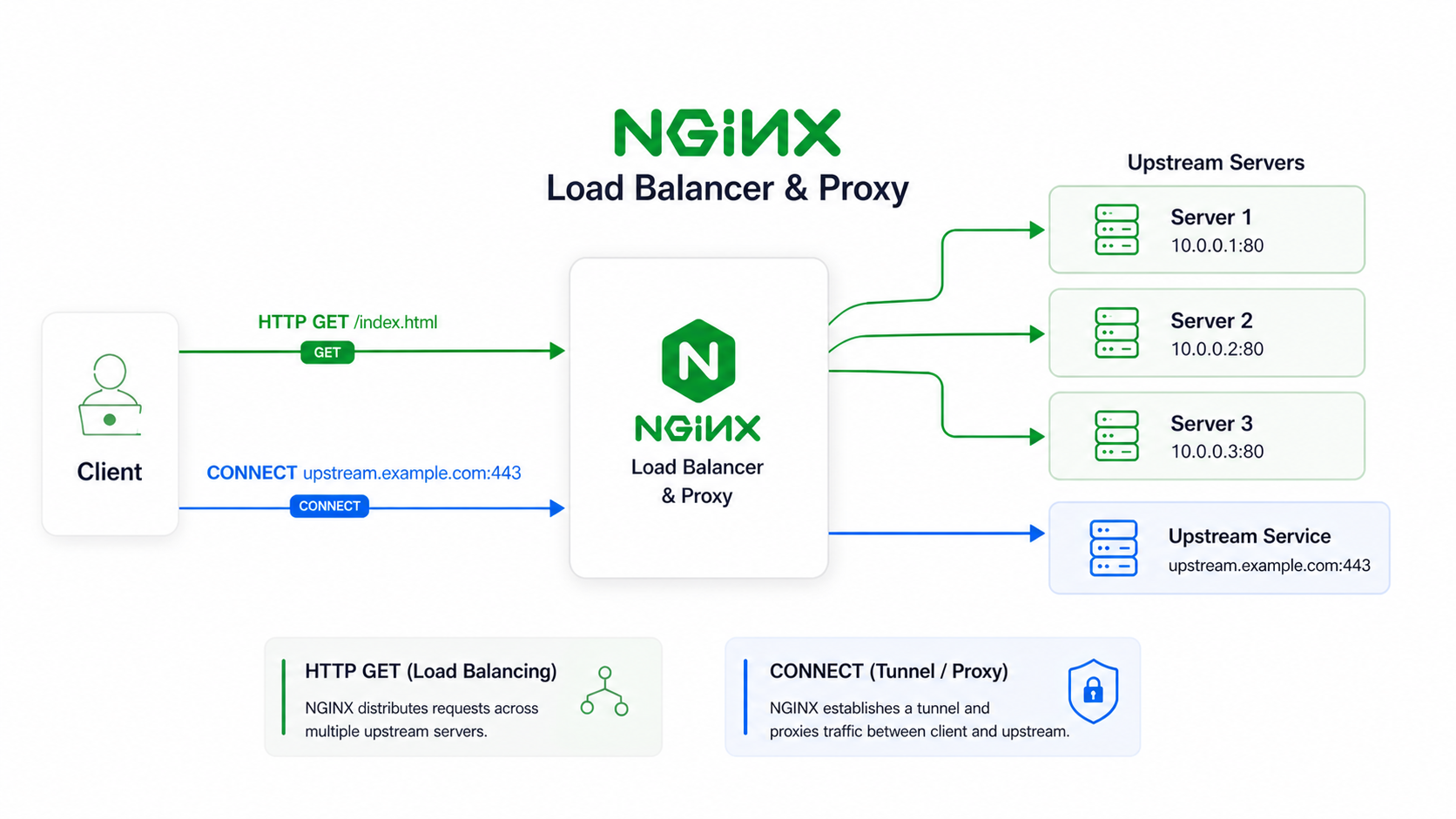
As shown above, nginx is widely used as a reverse proxy and load balancer, which is the ‘universal’ proxy for the server; however, the support for ‘proxy for the client’ is still immature.
The source code is licensed under a BSD License.
Table of contents
What problem is it solving?
This is basically a forward proxy for nginx, supporting the following:
- HTTP/1.1 CONNECT
- HTTP/2 CONNECT
- HTTP/3, CONNECT over QUIC
- CONNECT can co-exist with other HTTP methods
- Probe resistance
- Proxy Authentication
- Map based ACL
- Naive style padding protocol
- Extended CONNECT with connect-udp
Why it exists? What is vanilla nginx missing?
You can use the nginx upstream module to achieve an HTTP forward proxy, but that is limited to HTTP/1.1.
As for the vanilla nginx tunnel module, it is simply a wrapper around the upstream module, by setting u->upgrade
internally.
An example config to achieve this:
server {
  listen ...;
  resolver ...;
  # Some SSL settings

  location / {
    proxy_pass http://$http_host$uri;
    proxy_http_version 1.1;     # Since Nginx 1.29.7, this is default
    proxy_set_header Upgrade $http_upgrade;
    proxy_set_header Connection "Upgrade";
    proxy_set_header Host $http_host;
  }
}
This is commonly used for Websocket proxying, here are the 3 phases:
-
Phase 1: The client sends, for example, a GET request. Nginx receives it, sets the upgrade header, and proxies it to the upstream.
-
Phase 2: The upstream server sends 101, and the connection upgrades. Nginx stops parsing HTTP requests.
-
Phase 3: At this point, Nginx is simply doing TCP bidirectional byte relay.
Comparing to CONNECT
For HTTP/1.1 CONNECT, client sends:
CONNECT example.com:443 HTTP/1.1
Host: example.com:443
The vanilla Nginx tunnel module parses it, then sets up the upstream and sets ignore_input and u->upgrade to 1.
The official module can open a TCP byte relay for client but it lacks support over H2 and QUIC. This is
where my module does, it adds support for CONNECT over h2 and h3. CONNECT over h2/h3 is a huge benefit; it
can use multiplexing, only uses 1 TCP/QUIC connection for multiple connect requests, binary framing makes parsing
faster, and 0-RTT for h3.
NOTE
0-RTT, TCP fast open can’t be done if padding is used, defined by naiveproxy.
Why proxy_pass is not enough?
proxy_pass uses nginx http upstream module, it is mainly used for HTTP reverse proxying,
CONNECT is different; it requires a raw byte tunnel, which is similar to some features in the nginx stream
upstream module. That means the tunnel module cannot be simply done by reusing the http upstream
module; it either handles the byte relay manually or does surgical changes to the http upstream module.
In my implementation, I only used http upstream module to open a connection to upstream, then
handle byte relay myself, similar to what the stream upstream module did internally. This makes minimal
changes to nginx core.
Why it is called a tunnel? (Background knowledge)
Tunnel by definition in this context is to establish a secure, private communication path between 2 points over a public network. This module’s goal is to establish a byte relay connection between the client and nginx server. The security is guarded by the user’s nginx configuration, i.e. SSL support.
What is HTTP CONNECT?
HTTP CONNECT is a technique used to establish a secure, direct TCP tunnel through an HTTP proxy server. It is often used to tunnel other protocols, like https tunneling, TCP/UDP tunneling.
The CONNECT method differs in HTTP/1.1 and H2/H3.
In HTTP/1.1, CONNECT is commonly sent as:
CONNECT example.com:443 HTTP/1.1
Host: example.com:443
In h2/h3 it looks like this:
:method: CONNECT
:authority: example.com:443
There is an extended connect request, connect-udp, looks like this:
:method: CONNECT
:protocol: connect-udp
:scheme: https
:authority: proxy.example.com
:path: /.well-known/masque/udp/{target_host}/{target_port}/
capsule-protocol: ?1
Defined by RFC 9298 and RFC 9297 for the capsule protocol.
Difference between reverse proxy, forward proxy
The difference between reverse proxy and forward proxy is who the server is a proxy for. Reverse proxy is for servers, and forward proxy is for clients.
This tunnel module is a forward proxy, a proxy for the clients.
Differences in implementation
F5 Nginx tunnel module
This module is included in nginx paid version as an addon. While in nginx-1.31 roadmap, it will be moved from paid version to nginx OSS.
It is still unclear as of May 5, 2026, whether it will add support for connect over h2 and h3.
The source code of this module can be found on an ongoing PR in nginx oss repo, here. The code quality without a doubt is high, as it is written by nginx maintainers.
I read this implementation and adopted the idea of using the upstream module for initializing the request to the target. This avoids manual hostname resolution and creating an upstream round robin peer. It saved a lot of work for async DNS resolution and eliminated the likelihood of making an error. My module’s HTTP/1.1 is aligned with this version.
Where I still handled myself
- Proxy Authenticate: Because of the need for probe resistance. Probe resistance, this idea is from caddy’s forward proxy.
Proxy connect module from Alibaba
This one is a community-maintained version of forward proxy; the copyright shows it is from Alibaba group.
What is the problem of this module? And why I don’t like it.
-
Consider the 11 phases of nginx1. This module is registered at NGX_HTTP_POST_READ_PHASE. It checks whether connect is allowed before rewrite phases. However, nginx core internally exposed a flag
allow_connectin core parsing. This handler is no longer needed. -
Bypass Rewrite phase decision. Eg.
location / {return 403;}, if this is intended to return 403 for all requests, the post phase handler would bypass it and may return 405. -
Not actively maintained anymore; it has been 2 years since the last commit. It may have compatibility issues with mainline nginx.
As a result, I did not take too much inspiration from this module; it only showed me a way to handle connect, but it definitely is not optimal.
How it works internally?
The module registers 3 phase handlers.
- Pre-Access Phase Handler
- Proxy-Authenticate checking
- Access Control List matching
- Set content phase handler
- Pre-Content Phase Handler
- Skip pre content phases
- Content Phase Handler
- Init upstream (by nginx upstream module)
- Send 200
- Establish tunnel
Regarding why the pre-content phase handler is needed, the tunnel module can work fine without it.
The Pre-Access Phase sets the content phase handler for that request. It is for scenarios like try_files
and proxy_pass. They live in pre-content phase. If tunnel module appears first in the configuration,
its pre-content phase handler runs first, and it can skip the entire phase, without executing
try_files or proxy_pass.
What is the data flow looks like?
+-------------------+       +----------------------+      +-----------------+
|                   |       |                      |  NO  |                 |
| Request hit nginx |  ==>  | Is request CONNECT?  |  ==> | Module Declines |
|                   |       |                      |      |                 |
+-------------------+       +----------------------+      +-----------------+
                                       || YES
                                       \/
                            +---------------------+        +------------------+
                            | ( PreAccess Phase ) |  FAIL  |                  |
              ============  | Auth & ACL checking |  ====> | Finalize Request |
              ||            |                     |        |                  |
              \/            +---------------------+        +------------------+

 +--------------------------+                      +------------------+
 |     ( Content Phase )    | (Reject or timeout)  |                  |
 | Init upstream connection | ===================> | Finalize Request |
 |                          |                      |                  |
 +--------------------------+                      +------------------+
              ||
              \/
 +---------------------------+                      +---------------------------+
 |       (Send 200 OK)       |      (Byte Relay)    |                           |
 |      Tunnel started       | ===================> | padding / capsule hooking |
 |                           |                      |                           |
 +---------------------------+                      +---------------------------+
This is a simple illustration for module entry. For more internal details, check the README and source code in the repo.
HTTP/2 and QUIC support?
Both of them are supported. The module relies on nginx existing code, so it benefits from nginx excellent http2 and quic implementation.
Though quic throughput may not behave as well as http2 does, I still recommend using this module with h2.
Extended CONNECT, including connect-udp?
This is still a WIP feature, capsule and UDP support is finished, but connect-ip is still in consideration. As it requires opening a tun, and send ip packets to tun.
What is MASQUE and Capsule protocol?
MASQUE encodes target host and port in the path; it can be in the following form:
/.well-known/masque/{target_host}/{target_port}/
/masque?h={target_host}&p={target_port}
/masque{?target_host,target_port}
These are all valid MASQUE queries, which can be done with regex matching from the back of the URI. With MASQUE, the authority field can be left as the proxy server’s hostname; this allows it to pass through a CDN, like cloudflare.
Capsule protocol is used with “connect-udp”; it must be present both in client request
headers and server response headers. Defined as Capsule-Protocol: ?1. The capsule allows
DATAGRAMs encoded in HTTP payload in the form of:
+--------------------+------------------------------+----------+
|                    |                              |          |
| Type (QUIC varint) | Payload length (QUIC varint) | DATAGRAM |
|       (0x00)       |                              |          |
+--------------------+------------------------------+----------+
The DATAGRAM usually contains a Context ID in the front, for datagrams this value
is a fixed 0x00.
The above definitions can be found in the RFC, connect-udp
Auth and ACL
Auth: Standard Proxy-Authenticate
The auth module will not be compiled into module if nginx version >= 1.31.0, as 1.31 nginx already supports Proxy Authentication. It can be done cleanly, eg:
map $request_method $auth_realm {
  default off;
  CONNECT "proxy";
}

server {
  auth_basic $auth_realm;
  auth_basic_user_file /path/to/.htaccess;
  error_page 407 =405 @probe-resistance;

  location @probe_resistance {
    internal;
    # add_header Allow "Example";
    return 405;
  }
}
ACL: Utilize nginx maps
The module exposes a variable called $connect_target_host. In h2/h3, this is equivalent to $request_uri,
but in HTTP/1.1, there is no :authority header, which is why introducing a specific variable is clearer.
$connect_target_host is the raw target host in a string the client wants to connect to. It can be an IP, or hostnames,
or even hostname:port.
map $connect_target_host $is_granted {
    default              1;             # 1 for allow

    example.com          0;             # 0 for deny
}
The mapped value can range from 0 to 3. 0/1 for deny/allow and 2/3 for deny/allow with explicit logging.
TIP
If you are using a huge map, try to use sub maps to standardize it into IP or hostname without ports. Then map to
$is_granted, this maintains O(1) speed. If regex is in the huge map, it will be O(n).
Performance characteristics
The module is written in C. It is targeted for best performance under load. Performance can be affected by configurations, in theory, it should be excellent. But I still need to do testing and serious comparison with caddy, go based module.
Known Issues
- The connect-udp and classic connect is using seperate relay loop, and most of the code are similar. I would need to do some level of refactor, to only use 1 relay loop in for all connect methods.
Why not use existing tools?
Existing tools list:
- Caddy forward proxy
- HA proxy
These are 2 major tools commonly used. Both of them are mature and excellent. Use the nginx module for the nginx ecosystem. This module’s h2 and quic fingerprints will match exactly with any nginx server. And nginx has a large market share in web servers, which is considered a good camouflage.
Usage example
See module README. Example config below:
load_module ngx_http_tunnel_module.so;  # If build as an dynamic module

user www-data;
worker_processes auto;
worker_cpu_affinity auto;

events {
	worker_connections 1024;
}

http {
	tcp_nopush on;
	tcp_nodelay on;
	server_tokens off;

    # If you are using with a file server
    sendfile on;
	include mime.types;

	ssl_protocols TLSv1.2 TLSv1.3;
	ssl_prefer_server_ciphers off;

	limit_conn_zone $binary_remote_addr zone=addr:1m;

	# ---------------------------------------------
	# A map is used in ACL for O(1) lookup,
	# $connect_target_host variable provides raw
	# authority header, it is your job to regex
	# match these authority headers. Test the ACL
	# before production, some clients put authority
	# as raw ip, raw host, or even host:port.
	# This can be tricky, be careful!
	#
	# Allowed mapping values:
	# 0/1: deny/allow
	# 2/3: deny/allow + logging
	#
	# Example:
	# Blocking a single hostname:
	# ~^example\.com(:[0-9]+)?$
	# --------------------------------------------
	map $connect_target_host $is_granted {
		default 1;								# default allow

		~(^|:)fr\.a2dfp\.net(:|$)       0;		# deny
		~(^|:)static\.a-ads\.com(:|$)   2;		# deny + log
	}

	# Use Proxy Auth but on CONNECT only
	map $request_method $connect_auth_realm {
        default  off;
        CONNECT  "proxy";
    }

	server {
		listen 0.0.0.0:443 ssl;
		listen 0.0.0.0:443 quic reuseport;

		server_name example.com;

		http2 on;
        http3 on;
        http3_max_concurrent_streams 128;
        http3_stream_buffer_size 128k;
        quic_gso on;

		add_header Alt-Svc 'h3=":443"; ma=86400';

		limit_conn addr 100;
		limit_conn_status 429;

		client_body_buffer_size 256k;
		client_max_body_size 16M;

		resolver 1.1.1.1 8.8.8.8;

		ssl_certificate  fullchain.pem;
		ssl_certificate_key privkey.pem;

		tunnel_pass;                        	# Enable tunnel module
		tunnel_buffer_size 128k;              	# Buffer size for tunnel relay

		# NGINX 1.30 AND OLDER ONLY
		tunnel_proxy_auth_user_file /path/to/.htaccess;
		tunnel_probe_resistance off;
		tunnel_probe_resistance_allow_methods "";

		# NGINX 1.31.0 AND NEWER
		# auth_basic $connect_auth_realm;
		# auth_basic_user_file /path/to/.htaccess;
		# error_page 407 =405 @probe_resistance;

		# location @probe_resistance {
		#	 internal;
		#	 # add_header Allow "GET, POST, OPTIONS" always;
		# 	 return 405;
		# }

        tunnel_padding off;                 	# Opt in padding scheme for h2/h3
        tunnel_connect_timeout 60s;
		tunnel_idle_timeout 30s;

		# 0: deny, 1: allow, 2: deny + log, 3: allow + log.
		# $connect_target_host is the raw CONNECT authority.
		tunnel_acl_eval_on $is_granted;

		tunnel_udp on; 							# Enable connect udp with capsule protocol
		tunnel_udp_path $request_uri; 			# Path variable for parsing masque path

		# location blocks are recommended to set after
		# tunnel configurations, as tunnel module
		# injects a pre-content phase handler to skip
		# try_files and proxy_pass directive.
		# do not use return here, as it is in rewrite phase,
		# it will skip tunnel handler. This is a design decision.
		location / {
			# A file server example
		    root /var/www/html;
			index index.html;

			# To avoid The Discriminative Power of Cross-layer
			# RTTs in Fingerprinting Proxy Traffic
			# It is recommended to either proxy_pass to a server
			# running on the same nginx instance or
			# run a file server here directly.
		}
    }
}
Nginx® and the Nginx logo are trademarks of F5, Inc.. All rights reserved. This website is not affiliated with or endorsed by F5 or the Nginx project.
The image “illustration.png” was generated using OpenAI Image 2 and is used for illustrative purposes only.
Footnotes
-
HTTP Phases in nginx internal: https://nginx.org/en/docs/dev/development_guide.html#http_phases ↩