
Written on 12th Sep 2025, after spending an afternoon figuring out how to use both Git LFS and deploy to GitHub Pages. An ultimate shortcut guide.
TL;DR: GitHub Pages does not auto-fetch Git LFS objects. You must fetch LFS files during your build/deploy step (e.g., GitHub Actions) so that the files in your publish branch (often gh-pages) are real binaries, not LFS pointer text files. Then set Settings → Pages → Build and deployment → Source: Deploy from a branch and choose your gh-pages branch.
Why LFS + Pages?
GitHub Pages is great for static sites (personal sites, docs, game pages). Git LFS keeps your main repo light by storing big binaries (videos, large images, game builds) in a separate object store and committing pointers instead. The trick is deployment: Pages serves whatever is committed in the publish branch. If you push LFS pointers there, your site will show broken images. If you push the resolved binaries, it will work.
In this guide you’ll set up a workflow where your Pages site (often served from main or a dedicated gh-pages branch) stays lean while still referencing rich media.
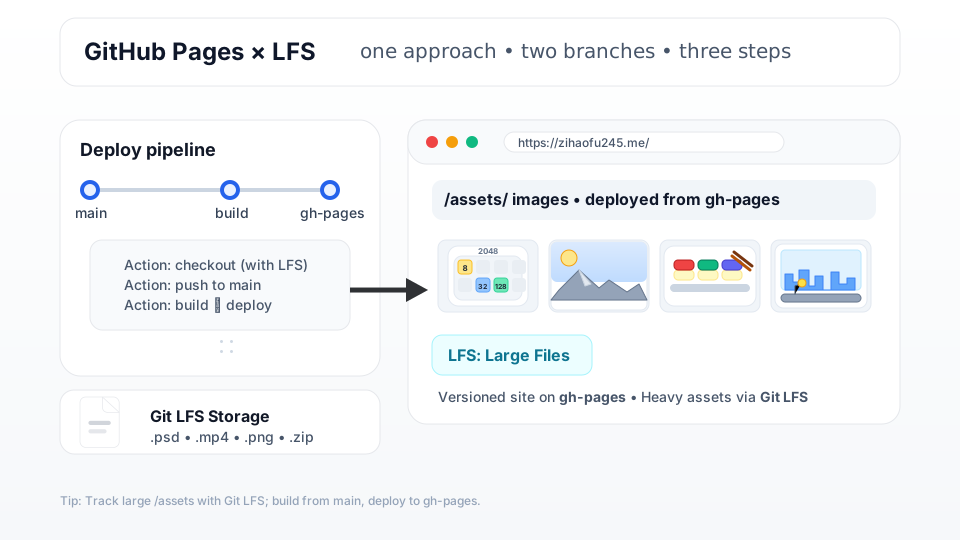
The Deployment Model
- Develop on main (or source). Track large assets with LFS.
- In CI (GitHub Actions), checkout with LFS so the runner downloads actual binaries.
- Build your site (e.g., Jekyll → _site/).
- Verify that the output contains no LFS pointers.
- Publish the built site to the gh-pages branch.
- In your repo, go to Settings → Pages → Build and deployment → Source: Deploy from a branch, choose Branch: gh-pages, and Save.
Set Up (Local)
# one-time per machine
git lfs install

# track intentionally (add more as needed)
git lfs track "*.png"
git lfs track "*.mp4"

# You should see lfs pointers instead of binary
cat .gitattributes

# add and push, as usual
git add .gitattributes assets/hero.mp4 assets/logo@2x.png
git commit -m "Track media via LFS"
git push origin main
You can also directly edit
.gitattributes
Ex. GitHub Actions Workflow
build → push to
gh-pages
Save as .github/workflows/build.yml
name: Build and Deploy

on:
  push:
    branches: [ main ]
  workflow_dispatch:

permissions:
  contents: write
  pages: write
  id-token: write

jobs:
  build-deploy:
    runs-on: ubuntu-latest

    steps:
      # Checkout code and pull LFS files
      - name: Checkout (with LFS)
        uses: actions/checkout@v4
        with:
          lfs: true
          fetch-depth: 0

      # Cache LFS objects
      - name: Cache Git LFS objects
        uses: actions/cache@v4
        with:
          path: .git/lfs/objects
          key: ${{ runner.os }}-git-lfs-${{ hashFiles('.gitattributes') }}-${{ github.sha }}
          restore-keys: |
            ${{ runner.os }}-git-lfs-${{ github.sha }}-
            ${{ runner.os }}-git-lfs-

      # Ensure LFS files are real (materialize)
      - name: Ensure LFS files are real (materialize)
        shell: bash
        run: |
          set -euo pipefail
          git lfs install --local
          git lfs fetch origin "${GITHUB_SHA}"
          git lfs checkout
          echo "LFS files tracked (pointer -> actual):"
          git lfs ls-files

      # Verify no LFS pointers in source assets
      - name: Verify no LFS pointers in source assets
        shell: bash
        run: |
          set -euo pipefail
          if grep -RIl "version https://git-lfs.github.com/spec" assets 2>/dev/null; then
            echo "::error::Found LFS pointer(s) under assets/. 'git lfs checkout' did not materialize some files." >&2
            exit 1
          fi
          echo "No LFS pointers in raw source assets."

      # Set up Ruby
      - name: Set up Ruby
        uses: ruby/setup-ruby@v1
        with:
          ruby-version: '3.3'
          bundler-cache: true

      # Build site
      - name: Build site
        run: bundle exec jekyll build --trace

      # Deploy to gh-pages
      - name: Deploy to gh-pages
        if: github.ref == 'refs/heads/main'
        uses: peaceiris/actions-gh-pages@v3
        with:
          github_token: ${{ secrets.GITHUB_TOKEN }}
          publish_dir: ./_site
          publish_branch: gh-pages
After the first successful run: Go to Settings → Pages → Build and deployment → Source: Deploy from a branch, select gh-pages and root (or /), then Save.
What to Notice (Important Caveats)
-
Pages won’t fetch LFS for you. The build pipeline must convert pointers → binaries before publishing.
-
gh-pages stores real binaries. They’re not tracked by LFS after deployment; they count toward repo/Pages limits. The Pages site limit is about 1 GB. If your site is heavy, consider:
-
External object storage + CDN (S3 + CloudFront, Cloudflare R2, etc.).
-
Optimizing images/video (transcode, compress, lazy-load).
-
Using the Pages “GitHub Actions” source (artifact-based deploy) instead of “branch” to keep heavy output out of your Git history.
-
-
LFS quotas: Storage and bandwidth quotas apply. Monitor repo Settings → LFS.
-
Migrations: To move existing history into LFS, use git lfs migrate import —include=“*.mp4” (history rewrite; coordinate with teammates).
Quick FAQ
Does LFS make Pages faster? Not by itself. It just keeps your source branch light. Optimize/serve media appropriately.
Can I keep gh-pages small? Prefer the Pages Actions source (artifact deploy) or host large media off-repo.
Do I need extra steps for private repos? The workflow above works for both; Pages for private repos requires GitHub Pro/Team/Enterprise and appropriate visibility.
What if I don’t use Jekyll? Replace the build step with your tool (Hugo, Docusaurus, Next static export, Eleventy, VitePress, etc.). The LFS+deploy pattern is the same.
Happy shipping!